

With the fall of Blockbuster, streaming became an essential part of our daily entertainment. However, not everyone is comfortable with linking their personal card to the subscription account. A Netflix gift card is the best solution, whether you are managing a monthly budget or simply do not want to use a credit card.
- What is a Netflix Gift Card & How Does it Work?
- Where to Buy Netflix Gift Cards (The Safest Options)
- How to Redeem Your Netflix Gift Card (Step-by-Step)
- How to Check Your Netflix Gift Card Balance
- Troubleshooting Why is My Code Not Working?
- Managing Your Balance & Subscription
- FAQ: Netflix Gift Card Common Questions
In this guide from EZ PIN, we will walk you through everything you need to know. Where to purchase? How to redeem a Netflix gift card on a website and via the TV app?
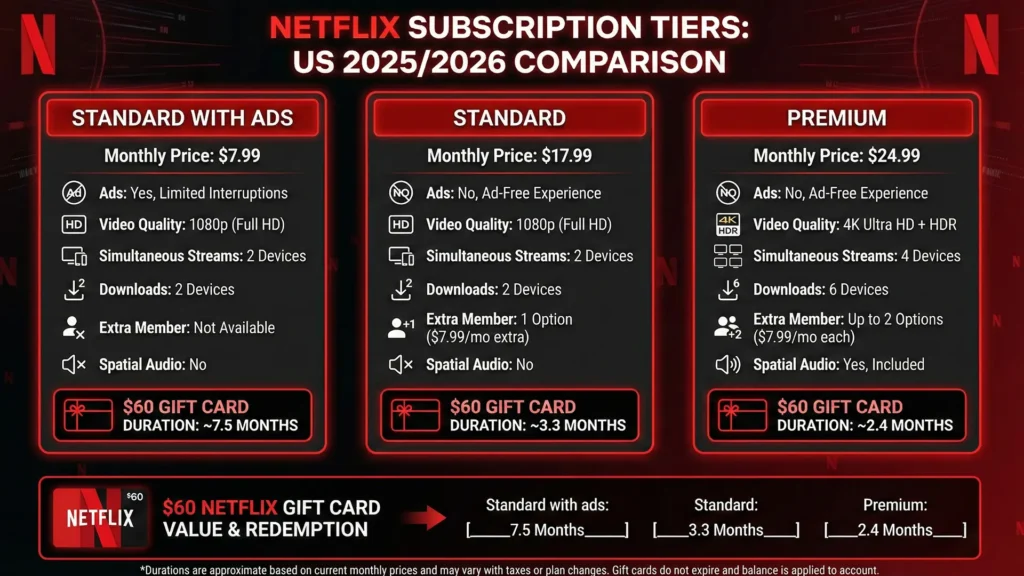
| Subscription Tier | Monthly Cost (Approx) | Est. Duration |
| Standard with ads | ~$6.99 | ~8.5 Months |
| Standard | ~$15.49 | ~3.8 Months |
| Premium (4K) | ~$22.99 | ~2.6 Months |
What is a Netflix Gift Card & How Does it Work?
A Netflix gift card is a prepaid digital voucher that allows you to add a certain value to your Netflix account balance. It often functions as a flexible alternative to credit cards, debit cards, or PayPal.
Here is why they are a smart choice for modern streamers:
- No Expiration: After the purchase, they never expire.
- Total Control: The balance is a fixed fund. Netflix automatically uses your balance for a monthly subscription fee until it runs out.
- Flexibility: The best thing is that you are not locked into a fixed-term contract (like a “6-month membership”). You get to choose the subscription duration (Standard with ads, Standard, or Premium).
Such cards are excellent items for gift-giving. They also suit the users who wish to avoid automatic renewals, which Netflix does best!
Where to Buy Netflix Gift Cards (The Safest Options)
Finding a Netflix gift card is easy. You can either check the nearest store for a physical card or choose the instant delivery option through EZ PIN.
Instant Digital Delivery
Since the whole operation is based on easy access and fast activation, we suggest using digital codes.
Netflix gift cards are delivered via SMS, WhatsApp, or email within minutes.
Online Resellers can benefit from infrastructure providers’ platforms like EZ PIN, which specialize in secure, instant delivery of digital codes for bulk or individual needs.
How to Redeem Your Netflix Gift Card (Step-by-Step)
Redeeming your code is a simple process that takes less than two minutes. Follow these steps to add funds to your account immediately.
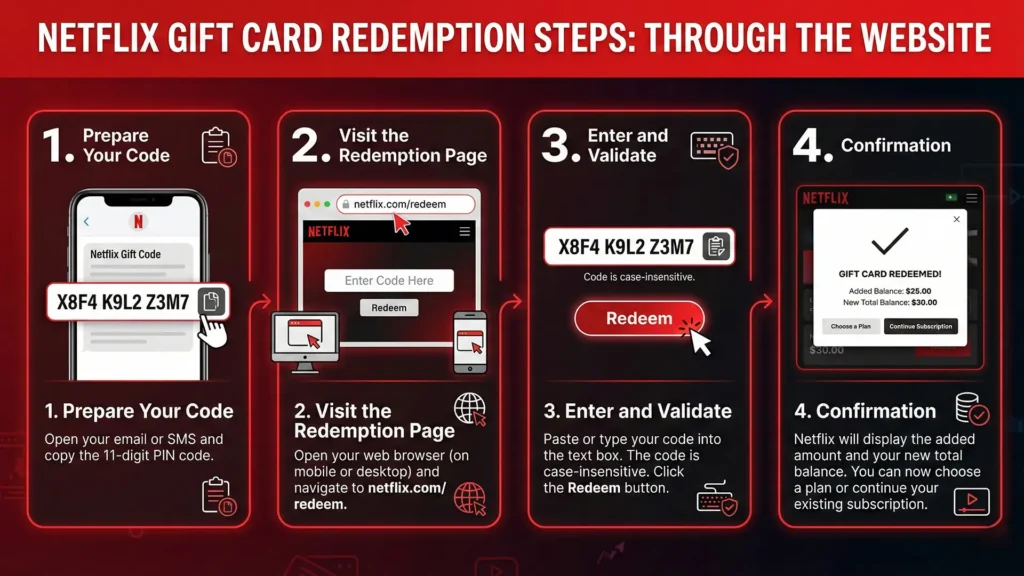
Through the Website
- Prepare Your Code. Open your email or SMS and copy the 11-digit PIN code.
- Visit the Redemption Page. Open your web browser (on mobile or desktop) and navigate to netflix.com/redeem.
- Enter and Validate. Paste or type your code into the text box. The code is case-insensitive. Click the Redeem button.
- Confirmation. Netflix will display the added amount and your new total balance. You can now choose a plan or continue your existing subscription.
Via the Netflix TV App
If you are trying to find a “Redeem Gift Card” button on your Smart TV, PlayStation, or Xbox, stop scrolling. Unfortunately, you won’t find it there.
Currently, the Netflix TV app does not support direct gift card redemption.
Why is that? This is a security measure to protect payment information on shared devices. But you can still use your gift card for your TV account by using the Second Screen Method:
- Stay on your TV: Keep your Netflix app open on the TV (logged in).
- Grab your Smartphone or Laptop: Open a web browser (Chrome, Safari, etc.).
- Go to the Redemption Page: Visit netflix.com/redeem.
- Log in: Ensure you sign in with the same email address used on your TV.
- Enter the Code: Type in your 11-digit PIN and click Redeem.
Once you see the confirmation on your phone, check the TV. Usually, the balance updates instantly.
Note: If it didn’t, simply sign out and sign back in on your TV. This will refresh the account details.
How to Check Your Netflix Gift Card Balance
Netflix, unlike many services, does not provide a separate tool to check the balance of a gift card without redeeming it.
However, if you have already used the card and bought a subscription, you can simply:
- Log in to your Netflix account.
- Navigate to the Account page
- Look for the Membership & Billing section.
- Click on Billing Detailsto see your current credit balance.
Note that Netflix will automatically use your balance for the monthly subscription fee until it is fully depleted.
Troubleshooting Why is My Code Not Working?
Sometimes, you might encounter different errors during the redemption process. Here are the most common issues and the solutions:
Fixing “Code Invalid” Errors
If Netflix shows an invalid code error, it is usually a typing error.
Check for similar characters: Ensure you haven’t confused the number 0 (zero) with the letter O, or the number 1 (one) with the letter I.
Solving Region Lock Issues (Currency Mismatch)
This is one of the most common problems users face. You should note that Netflix gift cards are region-locked, meaning the codes bought in USD can only work in a US account. Unfortunately, you cannot use a USD card on a European account currently.
We suggest always checking your account’s billing country in your settings before purchasing a card. If you have moved to another region, you may need to create a new account or contact the Netflix support team to change the region for you.
Managing Your Balance & Subscription
One of the most common questions users ask is‘how long will my gift card last?’
Since Netflix deducts the fee monthly based on the gift card balance, the duration depends on your plan.
Example Scenario (Assume you have a $60 Gift Card)
Prices vary regionally. But the good thing about a Netflix gift card is can switch between plans at any time to make your balance last longer or to enjoy higher quality.
Ready to Stream? Netflix gift cards provide the ultimate freedom to enjoy entertainment on your terms. Whether you are buying bulk digital gift cards for the company, a single code for yourself, or gifting a friend, ensure you choose the correct region and enjoy uninterrupted streaming.
FAQ: Netflix Gift Card Common Questions
1. Do Netflix gift cards expire?
No. Your gift card balance does not expire. It remains in your account indefinitely until it is used to pay for a subscription.
2. Can I use multiple gift cards on one account?
Yes! You can redeem multiple cards one after another. The balance accumulates, allowing you to “stack” months of subscription in advance.
3. Can I get a refund on a Netflix gift card?
Generally, no. Once a code is revealed or redeemed, it is non-refundable.
4. Do I need to add a credit card if I use a gift card?
No. If your gift card balance covers your first month, you are not required to add a backup payment method.