
If you are generating too much customer data without managing emails, social channels, support tickets, and sales calls, an AI-powered CRM can help your business. Without a unified system to organize the data and act on it, all revenue risks, customer churns, and team burnouts go unnoticed. Below, we will delve into what is CRM essentially, where it stands in 2026, and what role AI plays in the transition.
- The Evolution of CRM: From Rolodex to AI Co-Pilot
- Contact Management in The Early Days
- Cloud CRM as The Game Changer
- The AI Revolution for The Intelligent CRM
- Core Benefits of CRM Software
- Types of CRM and How to Choose the Right Model for Your Business
- A Detailed Breakdown of Key CRM Features
- Real-World Applications: Who Is CRM For?
- B2B Technology & SaaS
- Healthcare & Medtech
- Financial Services
- Real Estate
- E-commerce, Digital Goods & B2B Resellers
- Frequently Asked Questions (FAQ)
- Conclusion: The CRM You Choose Today Shapes the Business You Build Tomorrow
That is where CRM software comes in.
| Customer Relationship Management, or in short CRM, is a software that focuses on integrating all the customers’ data, interactions, behaviors, and workflows in one place. Sales, marketing, and support teams can benefit from building a stronger relationship, close deals more easily, and deliver an exceptional customer experience in scope. – Forbes |
However, recent CRM has evolved beyond a digital Rolodex. Recent leading CRM tools are AI-powered and automated systems. They are capable of predicting how customers behave, writing follow-up emails, generating leads in real time, and even doing autonomous actions. But it does it all with your permission. This is how Agentic AI works.
What is the difference between a CRM and an ERP?
This is one of the most common points of confusion in business software. Here is the fundamental distinction:
| Dimension | CRM vs. ERP |
| Primary Focus | CRM: Customer-facing relationships (sales, marketing, service). ERP: Internal business operations (finance, inventory, HR, manufacturing). |
| Data Managed | CRM: Contacts, deals, campaigns, support tickets, customer interactions. ERP: Purchase orders, invoices, payroll, supply chain, general ledger. |
| Primary Users | CRM: Sales reps, marketers, customer success teams. ERP: Finance, operations, HR, procurement. |
| Revenue Impact | CRM: Drives revenue growth. ERP: Manages and controls existing revenue and costs. |
| Integration | CRM and ERP are frequently integrated to give sales teams visibility into order status and finance teams visibility into pipeline forecasts. |
If you are trying to come up with your first CRM software or looking for an upgrade in your system, we cover all you need to know. So, what are the foundational concepts, and what are the cutting-edge AI features?
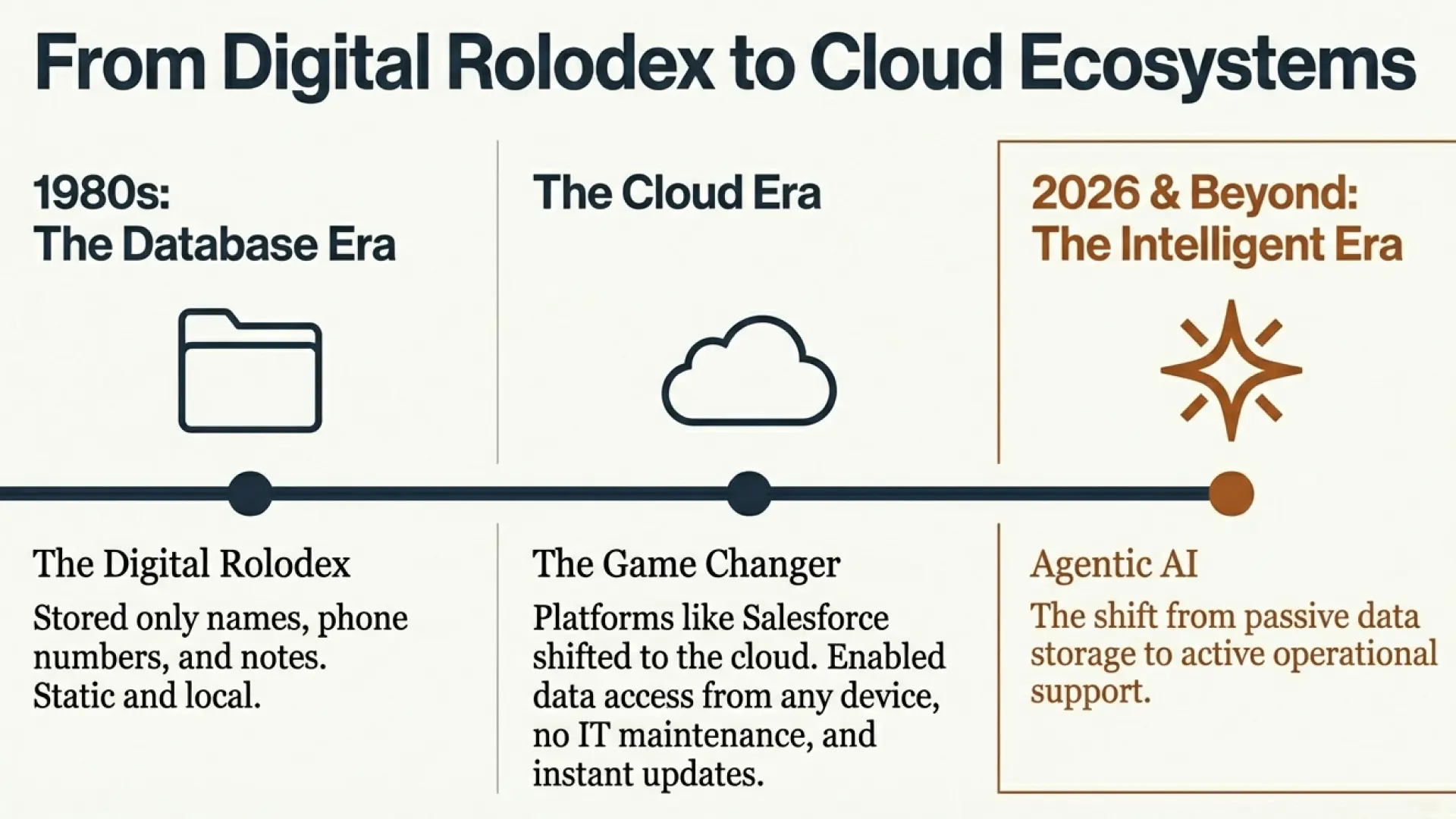
The Evolution of CRM: From Rolodex to AI Co-Pilot
Contact Management in The Early Days
The first CRM system emerged in the 1980s as a digital database. Only names, phone numbers, and meeting notes were stored. Platforms such as Salesforce were the first ones to shift to cloud-based CRM.
Cloud CRM as The Game Changer
The system drastically changed the industry. Companies had access to live data from any device, regardless of the physical location. The updates were made instantly, and the system was integrated effectively with email, calendar, and other marketing tools. The new CRM was adopted by almost every business imaginable.
In this era, cloud CRM owns a vast majority of the market, and the reasons behind this are that it helps you scale your business with no IT maintenance. Also, you can receive continuous updates for the team to keep up with cutting-edge technology.
The AI Revolution for The Intelligent CRM
After the cloud system, the most significant shift we have today is AI. Artificial Intelligence has evolved from being merely a personal assistant to a core operational feature that you can embed directly into CRM workflows.
Here is what an AI-powered CRM looks like:
- Predictive Analytics: AI models analyze sales data to forecast which leads are most likely to convert, what deal size to expect, and when a customer might churn
- Agentic AI: The next frontier in CRM is Agentic AI. It doesn’t just surface insights, but takes action. An AI agent can automatically send follow-up emails, schedule meetings, update records, and escalate high-priority leads without waiting for a human to click a button.
- Natural Language Interfaces: Ask your CRM a question in plain English, such as “Show me all deals that haven’t had activity in 14 days,” and you instantly get an actionable answer.
- AI-Assisted Selling: Real-time coaching during calls, auto-generated email drafts based on deal context, and intelligent next-step recommendations.
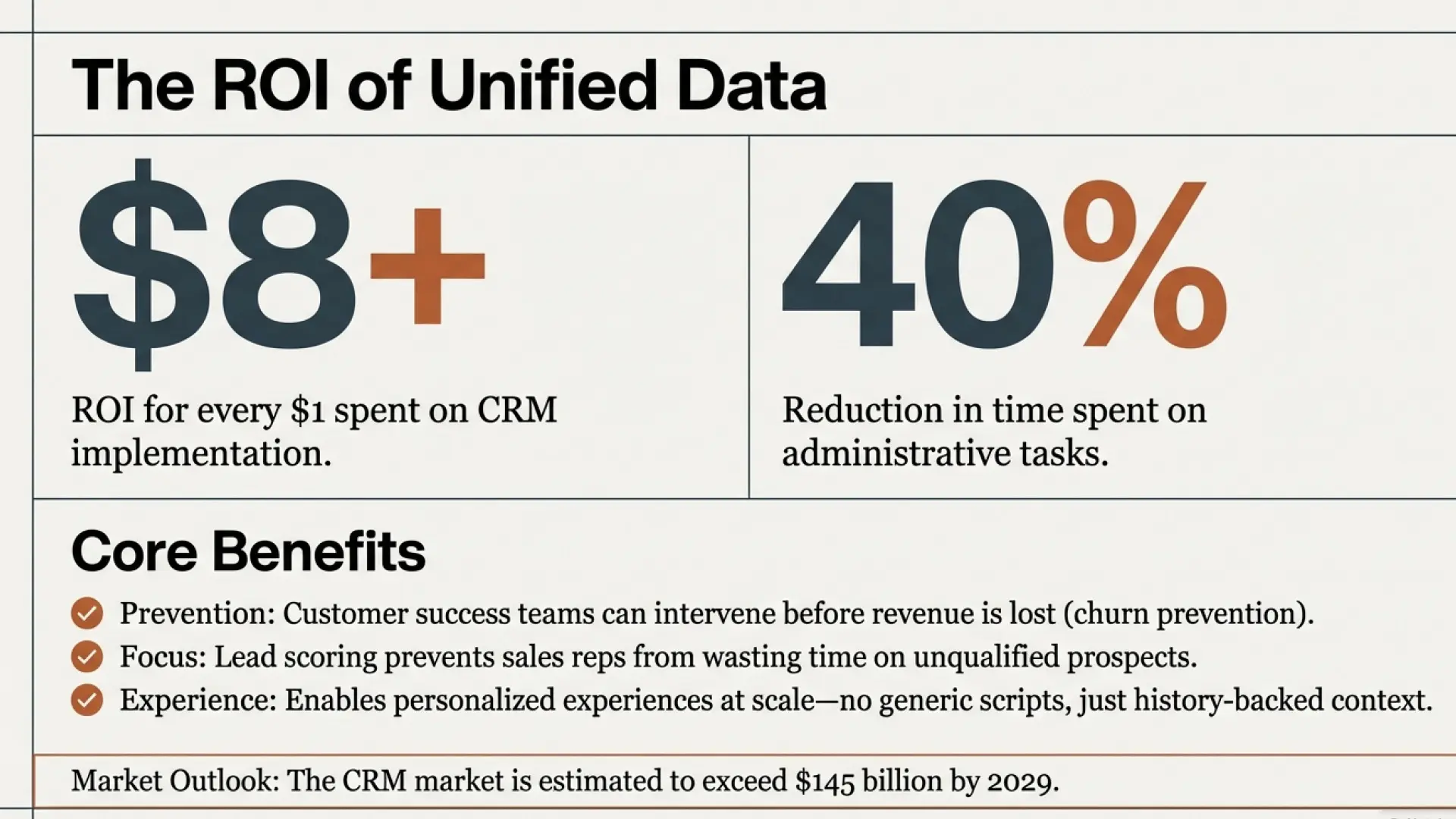
| Key Takeaway It is estimated that the CRM market will exceed by $145 billion by 2029. Those businesses that utilize the CRM tools are going to build a more sustainable competitive advantage for their customer acquisition. |
Core Benefits of CRM Software
1. A Single Source of Truth
The most immediate and powerful benefit of adopting a CRM system is the fact that it removes the need for data silos. Without a central system, the sales team stores the info traditionally in spreadsheets. The data is stored separately, and no one will have a full picture of any customer.
CRM system builds a comprehensive record for every customer, including full communication history, contact details, support interactions, deal status, and purchase records. You, as a business owner, can access the info in real time whenever the departments need it. Such a manageable system drastically improves collaboration across teams and boosts customer experience.
If you are operating across multiple channels, the unified CRM is not just convenient. For example, as a digital gift card distributor, you manage both direct customers and a B2B network. It is, rather, operationally efficient since each order, each account, and each conversation is stored in one place.
2. Measurable Cost Savings
CRM directly reduces the acquisition and retention costs. Research shows that businesses that implement CRM systems can deliver an ROI of $8+ for every $1 spent. The automation makes you save time and effort by:
- Reducing time spent on admin tasks by up to 40%.
- Preventing sales reps from wasting time on unqualified prospects with lead scoring and pipeline management
- Allowing customer success teams to intervene before revenue walks out the door.
- Automating follow-up sequences ensures no lead goes cold due to human oversight.
3. Elevated Customer Experience
Currently, customers expect a timely, personalized, and consistent experience across each channel. CRM makes it possible at scale. As a customer contacts support, the associate has access to their full history.
They can follow a customized approach rather than a generic script. The campaign launched by the marketing team targets behavior-based segments according to each user needs. The guesswork plays no part in the process.
The result is that the customers feel understood, valued, and more likely to stay loyal and refer others.
| Pro Tip Note that before you evaluate any CRM, come up with a map of the customer’s journey. Identify where you lose data, and where some steps slow you down. You can use the map for your CRM requirements checklist. |
Types of CRM and How to Choose the Right Model for Your Business
CRM tools vary based on your needs. Usually, there are three types. Understanding their differences can help you make a better choice based on your actual business needs.
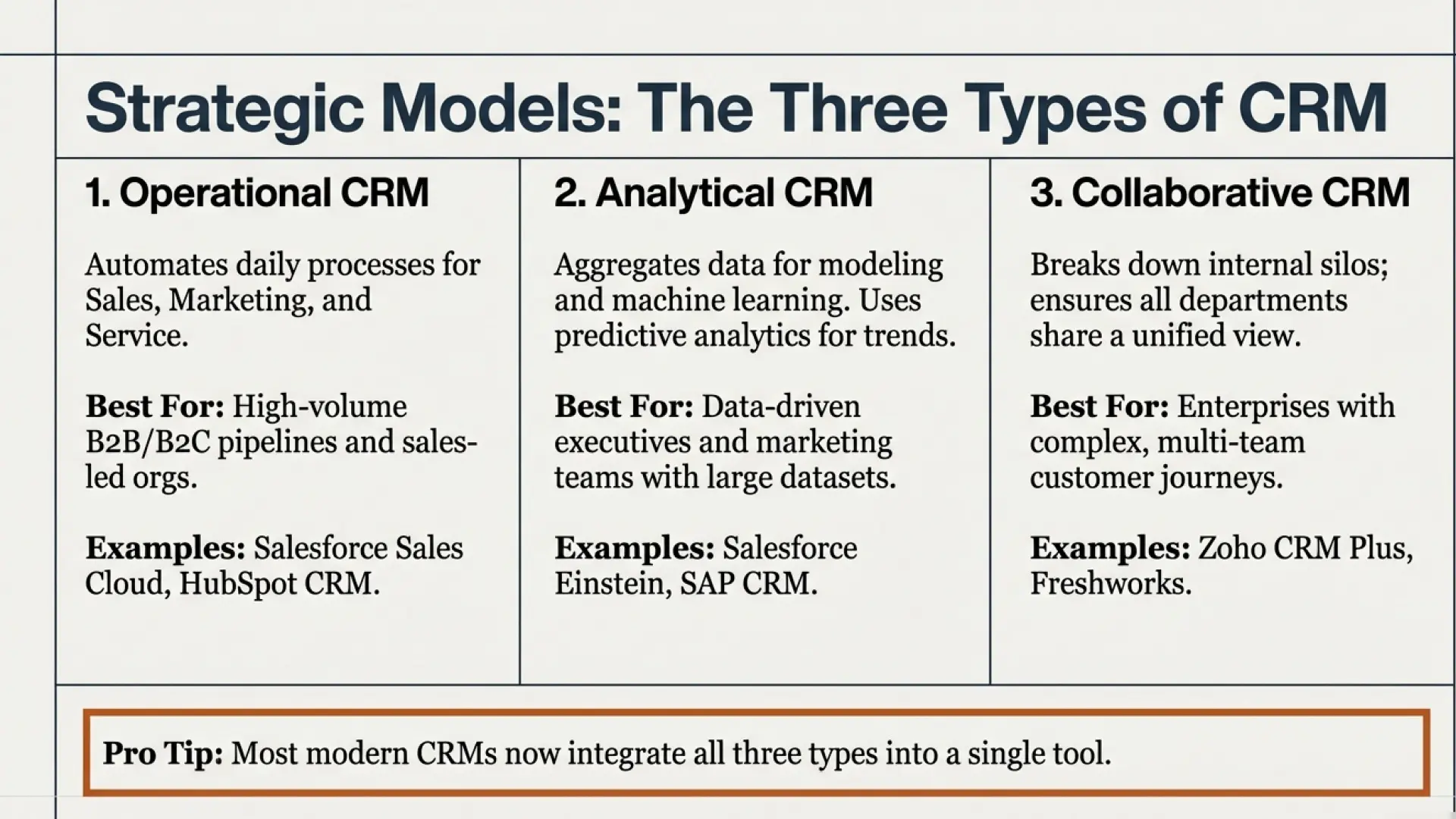
1. Operational CRM
Operational ones are designed to facilitate daily customer-issues processes. They automate and manage the workflows of Sales, Marketing, and Customer Service.
- Best for: Sales-led organizations, high-volume B2B or B2C pipelines, customer support teams.
- Core capabilities: Lead management, pipeline tracking, contact management, email automation, and helpdesk ticketing.
- Examples: Salesforce Sales Cloud, HubSpot CRM, Zoho CRM.
2. Analytical CRM
On the other hand, Analytical CRM goes data diving. Such tools aggregate customer info from various sources and apply statistical modeling and machine learning. They also use predictive analytics to identify patterns, trends, behaviors, and insights.
- Best for: Marketing teams, data-driven executives, businesses with large customer datasets.
- Core capabilities: Predictive analytics, customer segmentation, revenue forecasting, lifetime value modeling, campaign attribution.
- Examples: Salesforce Einstein Analytics, Microsoft Dynamics 365 Customer Insights, SAP CRM.
3. Collaborative CRM
Collaborative CRMs are the most comprehensive ones. They usually focus on breaking down internal silos by ensuring that every department, such as sales, marketing, support, and product management, shares a unified view of the customer and can coordinate actions easily.
- Best for: Enterprises with complex, multi-team customer journeys; companies where post-sale customer success is critical.
- Core capabilities: Shared interaction history, internal notes and activity feeds, cross-department workflow routing.
- Examples: Zoho CRM Plus, Freshworks CRM.
| Pro Tip Most modern CRMs often integrate all the major types in a single tool. By understanding these categories, you can evaluate the capabilities you need. |
A Detailed Breakdown of Key CRM Features
The role of Customer Relationship Management tools is to deliver measurable value. Here is a breakdown:
Automation
When it comes to sales and marketing, automation is the engine running the small teams and carrying their weight. Modern CRM allows you to automate workflows without the need for complex code architecture.
- Sales automation: Auto-assign leads to reps based on territory, deal size, or industry; trigger follow-up tasks when deals go stale; send contract reminders automatically.
- Marketing automation: Build multi-step drip campaigns that respond to customer behavior in real time. A prospect downloads a white paper, and the CRM immediately enrolls them in a targeted nurture sequence.
- Agentic AI automation: The most advanced tier. AI agents can act on your behalf. It includes researching prospects, drafting personalized outreach, updating CRM records post-call, and flagging at-risk accounts autonomously.
Analytics & Predictive Intelligence
The difference between CRM tools is what it does to your data. You can look for such analytical capabilities:
- Pipeline analytics: Real-time visibility into deal stages, win rates, average deal sizes, and sales velocity.
- Predictive Analytics:AI-powered forecasts that estimate the likelihood of a deal closing, predict customer churn probability, and identify upsell opportunities before they become obvious.
- Customer segmentation: Dynamically group contacts based on behavior, firmographic data, or engagement scores to enable hyper-targeted campaigns.
- Revenue forecasting: Board-ready forecasts powered by ML models that account for seasonality, pipeline health, and rep performance.
Integration Ecosystem
If a CRM tool fails integrating your existing workflows, it creates more problems than it solves. You should prioritize robustness, native integrations, and open APIs from AI.
- Email & Calendar: Gmail, Outlook, Microsoft 365, Google Workspace.
- Marketing Tools: Mailchimp, Marketo, HubSpot Marketing Hub.
- Communication: Slack, Teams, Zoom, RingCentral.
- ERP & Finance: NetSuite, QuickBooks, SAP.
- B2B Commerce & Digital Goods: Platforms like EZ PIN, which powers digital gift card and top-up PIN distribution for B2B reseller networks, connect with CRM systems to give sales teams real-time visibility into reseller order history, account balances, and reorder patterns. This kind of integration closes the gap between commerce activity and relationship management.
| Manage Your Reseller Relationships Smarter with EZ PIN EZ PIN is the B2B platform built for digital goods distributors and reseller networks. Sell gift cards, top-up PINs, and digital products at scale with the account management tools your CRM strategy needs to back it up. Start Selling on EZ PIN Today → ezpin.com |
Real-World Applications: Who Is CRM For?
The common assumption is that CRM software only works for large companies and businesses. But actually, CRM delivers value across all industries and business sizes.
B2B Technology & SaaS
SaaS companies are the usual users of CRM tools. They use CRM to manage logs, sales cycles, and more. For them, deal forecasting and customer success workflows are crucial.
Healthcare & Medtech
Healthcare organizations use CRM for managing patient outreach, care coordination, and appointment follow-ups. Such tools enable care teams to track the patient’s journey while keeping the patient’s privacy.
Financial Services
Wealth managers, Digital Banks, and Insurance Firms use CRM to track the clients’ portfolios, renewal pipelines, and compliance interactions.
Real Estate
Real estate agents and brokerages also use CRM. Managing buyer and seller relationships, automating property listing alerts, tracking showing activity, and nurturing long-term leads are what sales reps can benefit from.
E-commerce, Digital Goods & B2B Resellers
As you know, this is the fastest-growing model of CRM usage. Companies working with digital goods, especially gift card resellers, prepaid top-up PIN providers, and gaming credit stockers, usually face a special challenge. The high transactions across their network are hard to manage, while, on the other hand, they have to maintain a personal account for their customers to drive loyalty programs and repeat revenue channels.
In EZ PIN, our purpose-built platform is made exactly for this environment. As a B2B digital goods and reseller platform, EZ PIN enables distributors and B2C platforms to manage reseller accounts, streamline PIN delivery, and process payments at scale.
As you connect to a CRM, the sales team gains a complete view of each reseller’s purchase history, preferred product categories, and revenue trajectory..
Frequently Asked Questions (FAQ)
How much does CRM software cost?
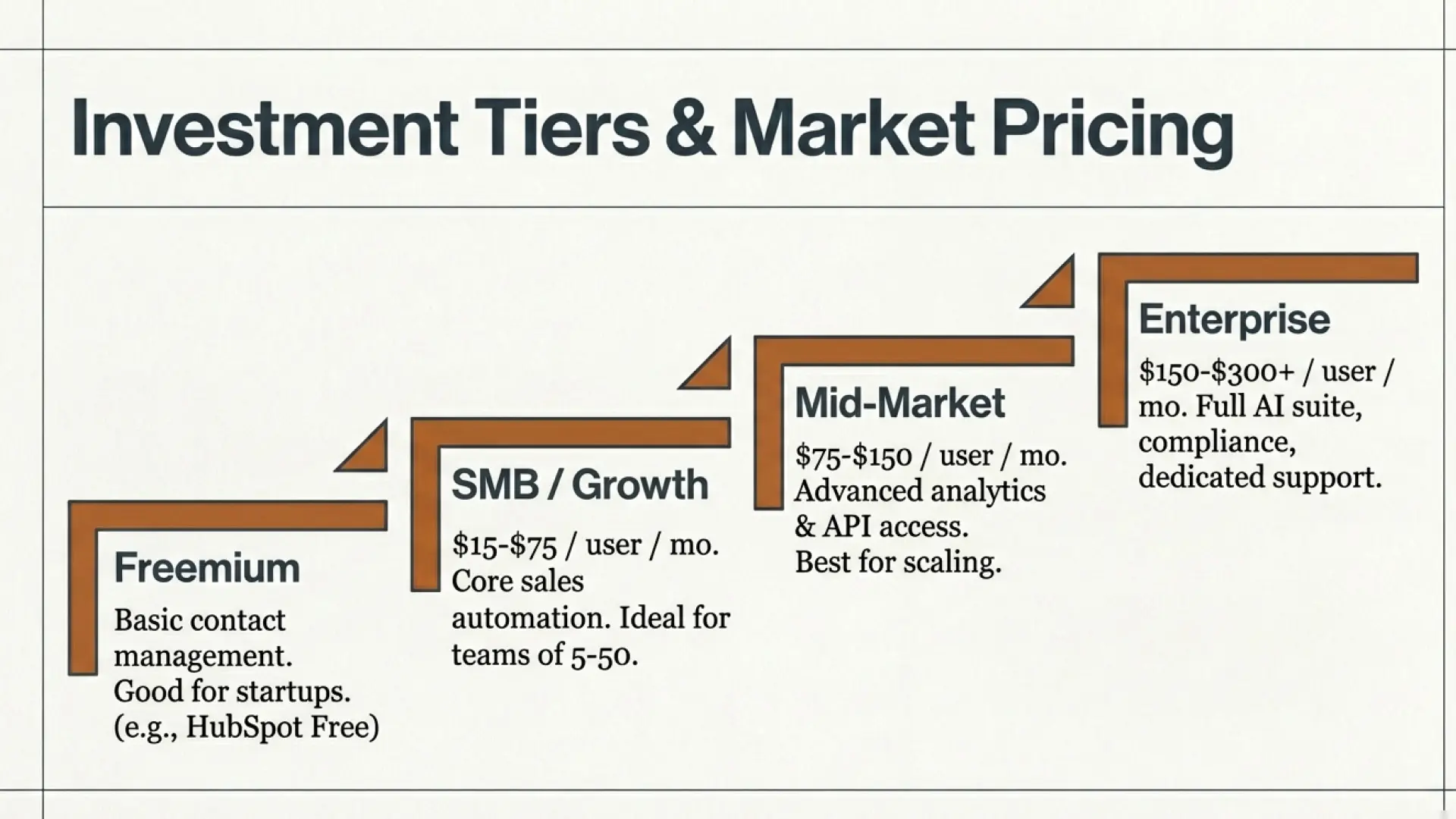
CRM pricing varies enormously based on features, user count, and vendor. Here is a general framework:
| Tier | Price Range & What You Get |
| Free / Freemium | HubSpot CRM Free, Zoho CRM Free — basic contact management, limited users, limited automation. Good for early-stage startups. |
| SMB / Growth | $15-$75/user/month — core sales automation, pipeline management, email integrations, reporting. Ideal for teams of 5-50 reps. |
| Mid-Market | $75-$150/user/month — advanced analytics, workflow automation, AI features, API access. Best for scaling companies. |
| Enterprise | $150-$300+/user/month — Salesforce Enterprise, Microsoft Dynamics — full AI suite, enterprise integrations, compliance features, dedicated support. |
How do I choose the right CRM?
Follow this five-step framework:
- Define your use case: Is your primary need sales pipeline management, marketing automation, or customer support?
- List your required integrations: What tools must your CRM connect with on day one — including any commerce or B2B distribution platforms you rely on?
- Set a realistic budget: Include implementation and training costs, not just per-user licensing.
- Run structured trials: Shortlist 2-3 vendors and run a 30-day trial with your actual sales data and real workflows.
- Evaluate AI capabilities: Ask each vendor specifically how their AI features work, what data they use, and what the roadmap looks like for Agentic AI capabilities.
Conclusion: The CRM You Choose Today Shapes the Business You Build Tomorrow
As discussed, CRM has evolved from a single-entry database into the central engine of modern revenue operations. Especially with AI-powered APIs and Predictive Analytics, CRM tools do far more than just store data for you.
Recently, CRM tools can help you actively win deals, reduce customer churn, and boost relationships in scale.
If your competitors are outperforming you in 2026, they are not doing it with a bigger budget or a smarter tram. They achieved it with better automated systems. They capture every signal, every insight in the right moment, and their human touch only needs to focus on the work that is being done by AI.
A well-implemented CRM is not just a data center. It continuously gets smarter, more personalized, and more valuable every single day your team uses it. And for businesses in the digital goods and B2B reseller space, pairing a strong CRM with the right commerce infrastructure is what separates teams that scale from teams that stall.
| Ready to Scale Your Digital Goods Business? EZ PIN gives B2B resellers and digital goods distributors everything they need to sell smarter: instant PIN delivery, reseller account management, real-time inventory, and seamless payment processing. Join thousands of businesses already growing with EZ PIN. Create Your Free EZ PIN Account → ezpin.com |